Guide to Unistat Label Sizes and Templates (Find the Right Fit for Your Needs)
Choosing the right label size isn’t just about aesthetics. It directly affects print accuracy, cost efficiency, and how professional your products or parcels look.
When label sizes and templates don’t match, the same problems appear again and again. Addresses get cut off at the edges, barcodes drift into label gaps, and misprints waste entire A4 sheets. If you’re using Unistat labels, selecting the correct label size and pairing it with the right template can save time, reduce wastage, and eliminate frustrating alignment issues.
In this guide, you’ll learn how Unistat label sizes work, which sizes are most useful for Singapore businesses, and how to pair products from LabelShopOnline with official Unistat templates so you can print confidently for your business needs.
How Unistat A4 Label Sizes and Layouts Work
Unistat labels are commonly supplied as A4 sheet labels, which makes them easy to print using standard inkjet and laser printers. Each A4 sheet comes with a specific number of labels, often known as “labels per page” on retail sites.
When you look at a Unistat label specification, the combination of individual label size and number of labels per sheet tells you three important things:
- How much information fits on each label
- How many labels you get from each printed sheet
- How easy the label is to read at a glance
For example, Unistat U4464-100 has a label size of 70 x 37 mm, arranged as 24 labels per A4 sheet, with 100 sheets per pack (a total of 2,400 labels). This makes it a solid mid-size option for address labels and general-purpose mailing, where you need more space than a small return-address label but don’t require a large parcel label.
At the smaller end of the range, Unistat offers compact options such as Unistat U4270-100, which measures 38.1 × 21.2 mm and fits 65 labels per A4 sheet. These labels trade off content space for volume and are well suited for barcodes, short text, shelf labels, or internal identification where information is minimal and clarity is the priority.
How to Choose the Right Unistat Label Size
Choosing the right label size becomes much easier when you think through these four questions.
1. What are you using the label for?
Start with the job the label needs to do:
- Shipping parcels → Large or medium labels so addresses, barcodes, and tracking numbers are easy to read at a glance.
- Packaging or branding → Medium labels work best, giving you enough space for your logo and key information without looking cluttered.
- Barcodes or internal labels (shelves, boxes, assets) → Small labels are ideal for short text, item codes, or barcodes.
2. How much information needs to fit on the label?
The more content you print, the bigger the label should be.
- Long addresses, logos or extra notes → Choose a bigger label.
- Short names or codes → A smaller label is fine.
A quick rule of thumb: if you can’t keep a clear margin around the text at a comfortable reading size, move up to the next label size.
3. Which printer will you use?
Most Unistat labels are compatible with both inkjet and laser printers, but correct setup is still essential. Always do a test print on plain paper first, then hold it against a label sheet to check that everything lines up. This simple step can save you from wasting entire sheets.
4. Are you using the sheet efficiently?
Smaller labels give you more labels per sheet, but only if they remain easy to read.
If a label feels cramped, hard to scan, or forces you to use multiple labels where one would do, it’s not really saving money.
Popular Unistat Sizes from LabelShopOnline
LabelShopOnline stocks a wide range of Unistat labels that follow the official Unistat multi-purpose label specifications. Businesses can rely on these dimensions and labels-per-sheet figures when setting up templates.
-
Unistat U4464-100 (24 labels per sheet)
- Label size: 70 × 37 mm
- Sheet size: A4
- Labels per sheet: 24
- Labels per pack: 2,400 (100 sheets)
- Material: Permanent white, suitable for inkjet and laser printers
- Typical uses: Address labels for C5/C4 envelopes, e-commerce parcels, and general office labelling
-
Unistat U4455-100 (33 labels per sheet)
- Label size: 70 × 25.4 mm
- Sheet size: A4
- Labels per sheet: 33
- Labels per pack: 3,300 (100 sheets)
- Material: Permanent white, suitable for inkjet and laser printers
- Typical uses: Standard address labels, slim file labels, compact product or barcode labels where you still need one or two lines of text.
-
Unistat U4474-100 (40 labels per sheet)
- Label size: 48.5 × 25.4 mm
- Sheet size: A4
- Labels per sheet: 40
- Labels per pack: 4,000 (100 sheets)
- Material: Permanent white, suitable for inkjet and laser printers.
- Typical uses: Smaller product labels, shelf labels, coded stickers, or short identifiers.
Unistat A4 Label Size Reference Table
The table below lists popular Unistat A4 sheet label sizes, including exact dimensions, number of labels per sheet, and common use cases, based on the official Unistat multi-purpose label specifications.
| Unistat product code | Label size (mm) | Labels per A4 sheet | Typical use cases |
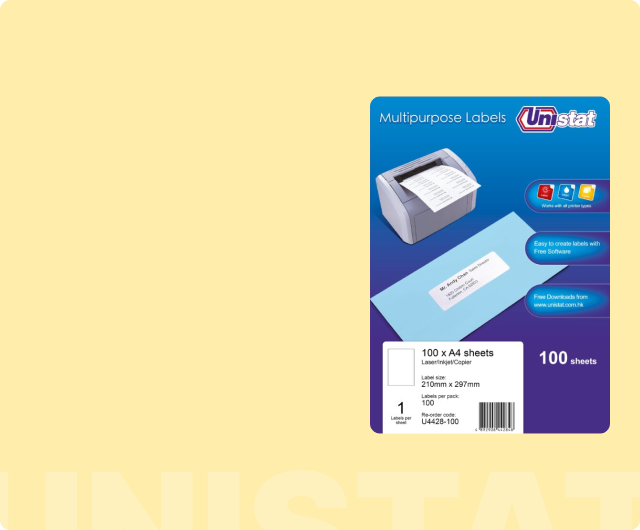
| U4428-100 | 210 x 297 | 1 | Full-page labels, cartons, signage |
| U4282-100 | 210 x 148 | 2 | Large cartons, A5-sized labels |
| U4676-100 | 105 x 148 | 4 | Medium parcels, large filing labels |
| U4426-100 | 105 x 70 | 8 | Parcels, shipping labels |
| U4470-100 | 105 x 74 | 8 | Parcels, return labels |
| U4269-100 | 99.1 x 67.7 | 8 | Larger address labels |
| U4278-100 | 70 x 50.8 | 15 | Shipping, medium product labels |
| U4668-100 | 70 x 42.4 | 21 | Mailing labels, general office |
| U4677-100 | 63.5 x 38.1 | 21 | Standard address/parcel labels |
| U4464-100 | 70 x 37 | 24 | Mailing & general use |
| U4455-100 | 70 x 25.4 | 33 | Slim address / file labels |
| U4474-100 | 48.5 x 25.4 | 40 | Small product / inventory labels |
| U4270-100 | 38.1 x 21.2 | 65 | Small barcodes, asset tags, inventory |
All dimensions and layouts listed above follow official Unistat A4 sheet standards, allowing you to select the correct label template with confidence when printing on inkjet or laser printers.
How to Download and Use Unistat Label Templates
Once you’ve chosen your preferred label sizes, the next step is to download the correct template so your design prints accurately on the sheet. For Unistat labels, the most reliable source is the official Unistat multi-purpose label table, which provides a dedicated template download for each product code.
On that table, you’ll see columns for Product, Product Number, Label Size, Labels Per Sheet, and a “Download Template” link.
For example:
- U4282-100 (210 × 148 mm, 2 labels per A4 sheet, white), template download available from the Unistat product table
Downloading Unistat A4 label templates for Word
Most Unistat templates are supplied as Microsoft Word files, with the label grid already set up. This allows you to type or paste your content directly into each label cell without manually adjusting margins or spacing.
How to Pair LabelShopOnline Sizes with Unistat Templates Using Product Codes
Because LabelShopOnline lists the same Unistat product codes (such as U4464-100) and dimensions as the official table, pairing the two is straightforward:
-
Confirm the product code and dimensions on LabelShopOnline
Example: U4274-100, 38.1 x 21.2 mm, 65 labels per A4 sheet, permanent white, 100 sheets per pack.
-
Locate the same code on the Unistat products/software page
Find U4274-100 in the multi-purpose labels section with the same size and labels-per-sheet details.
-
Download the template for that code
Click the “Download Template” link, save the Word file, and open it in your word processing or label design software.
-
Repeat for other sizes you buy from LabelShopOnline
For U4455-100 (70 x 25.4 mm, 33 per sheet) or U4668-100 (70 x 42.4 mm, 21 per sheet), follow the same code-matching process.
Using this code-based pairing system keeps things simple for your team. As long as they know which Unistat product code is loaded into the printer, they’ll know exactly which template to use.
Printing Tips for Best Results
- Start with the official template file rather than copying tables into a new document.
- Print at 100% scale at all times. Avoid settings like “Fit to page” or “Shrink to fit”.
- Confirm A4 page size in both the document settings and the printer driver before printing.
- Always run a test print on plain paper first. Place it behind a label sheet and hold them up to the light to check alignment before printing on actual labels.
- Store label sheets flat to prevent curling.
- Inkjet printers work best with lighter ink coverage, while laser printers offer sharper text for barcodes.
FAQs
1. How do I choose the right Unistat label size for my needs?
Choose a label size based on what you are labelling (envelopes, parcels, files, or products) and how much information needs to fit on each label. Use larger labels for long addresses or branding elements, and smaller labels for short codes or barcodes. A good rule is to choose the smallest label that still keeps text clear and easy to read.
2. Which Unistat label sizes are best for mailing and shipping?
For most mailing and standard parcels, medium-sized labels work best. Popular options include:
- 70 × 37 mm (U4464-100, 24 labels per sheet)
- 70 × 25.4 mm (U4455-100, 33 labels per sheet)
For larger cartons or outer packaging, consider larger formats such as 105 × 70 mm or 105 × 74 mm (8 labels per sheet), which provide more space for addresses, order numbers, and handling notes.
3. How do I know how many labels I get per A4 sheet and per pack?
Each Unistat product code has a fixed specification that includes a defined label size, labels per sheet, and labels per pack in the official table.
For example, U4474-100 measures 48.5 × 25.4 mm, has 40 labels per A4 sheet, and comes in packs of 100 sheets. You can find these details on the official Unistat table or on the Label Shop Online product page.
4. What should I do if my Unistat labels print misaligned or between the labels?
Start by checking the basics:
- Make sure both your document and printer are set to A4
- Ensure print scaling is set to 100% (no “Fit to page” or “Shrink to fit”)
Next, print a test page on plain paper, place it in front of a label sheet, and hold both up to the light. If everything is shifted slightly, adjust margins or offsets in the template until the alignment is correct before printing on actual labels.
5. Do I have to use Unistat templates, or can I use equivalent Avery-style layouts?
You can use any template that matches the exact label size, number of labels per sheet, and margins, including equivalent Avery-style layouts. Many A4 label formats are interchangeable when the measurements are identical, which is why “Unistat vs Avery equivalent layouts” is a useful guideline rather than a strict brand rule.
6. Where can I buy Unistat labels in Singapore, and do the sizes match the official Unistat table?
You can purchase Unistat labels from LabelShopOnline.SG, an authorised reseller serving Singapore and neighbouring countries. If you already know your Unistat product code, search it directly on LabelShopOnline.SG to go straight to the matching product page.